Every makeup lover has a ghost product: the one you saw once and never found again. Maybe it was a foundation on a creator's shelf, a lipstick bullet on a café table, or something in your own drawer whose label rubbed off years ago. The good news is that you can now identify makeup from a photo in seconds — the same way you'd identify a song by holding up your phone. Point a camera, or upload a screenshot, and an AI names the brand, the product, and the shade.
This guide walks through what a photo actually reveals about a product, how an AI makeup identifier turns those pixels into a name, how to take a picture that identifies cleanly, and what to do when the machine isn't sure.
Why a photo is enough to identify makeup
Makeup packaging is designed to be recognized. Brands spend enormous effort making a tube, compact, or bottle unmistakable on a shelf — and everything that makes it unmistakable to you makes it identifiable to software. A single photo can carry several layers of evidence:
- Packaging shape and finish — the silhouette of a lipstick bullet, the cut of a glass foundation bottle, a magnetic palette lid.
- Logos and typography — even a partial logo or a distinctive typeface narrows the field dramatically.
- Printed text — product names, shade names, and codes stamped on the base are readable even when you can't make them out yourself.
- The product's own color — the shade of the bullet, powder, or liquid, which separates one shade from its neighbors in the same range.
No single clue has to be complete. Identification works the way a good detective does: three partial clues that agree beat one perfect one. That's why a slightly blurry photo of a lipstick can still come back with the right answer — the case shape, the brand's signature cap, and the bullet's color triangulate it. It's also why you should photograph the whole product when you can, rather than cropping tightly to the logo: every extra clue in the frame is another vote toward the correct match.
How an AI makeup identifier works
Under the hood, a makeup product identifier runs your photo through a few distinct steps. (We go deeper on the technology in how AI makeup scanners work, but here's the short tour.)
- Object detection. The AI finds the product in the frame and separates it from hands, backgrounds, and everything else in the shot.
- Feature reading. It extracts the recognizable details — packaging geometry, logo marks, printed text, and color values of both the case and the product inside.
- Database matching. Those features are compared against a library of known products. True Shade, for example, matches against more than 10,000 recognized products across the major and indie brands.
- Confidence scoring. The best tools don't just answer — they tell you how sure they are, so a 97% match and a 60% guess look different at a glance.
The shade step deserves a special mention, because it's the part humans struggle with most. Telling a MAC lipstick from a Maybelline one is easy; telling two adjacent nudes in the same range apart is not. AI reads the actual color values rather than eyeballing them, which is why photo identification is often more precise on shade than a person squinting at a swatch would be.
TRY IT YOURSELF
Name any product in one snap.
True Shade identifies the brand, product, and exact shade from a single photo — then checks it against your undertone, flags the ingredients, and lines up cheaper dupes across 600+ brands.
Download True Shade freeHow to take a photo that identifies cleanly
Identification is forgiving — far more forgiving than shade matching your own skin — but a few habits raise your hit rate from good to nearly automatic.
1. Get the packaging in frame
The case, tube, or bottle is the richest source of clues. Photograph the product itself rather than just a swatch on skin, and include the logo side if you can. For lipsticks, the base of the tube often carries the shade name — worth its own close-up.
2. Fill the frame, then hold still
A product that occupies most of the photo gives the AI more pixels to read. Get close, let the camera focus, and keep text as sharp as possible. One steady shot beats five hasty ones.
3. Use even light, skip the filters
Harsh glare off glossy packaging can wipe out printed text, and filters rewrite the very color data that separates one shade from the next. Plain, even lighting and an unedited photo preserve everything the identifier needs.
4. Screenshots count as photos
You don't need the product in hand. A paused video, a zoomed product shot from social media, a photo of a friend's vanity — all of it works, though heavily compressed screenshots-of-screenshots lose detail. If you're working from someone else's image, our guide to finding a makeup product from a picture covers that hunt step by step.
What happens after the name
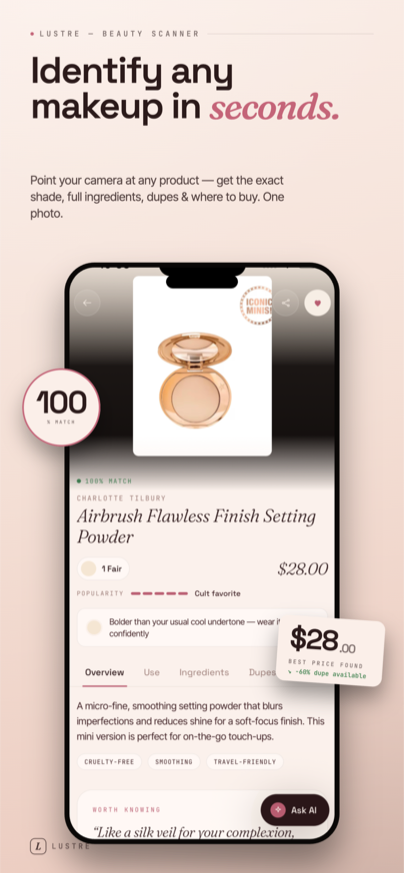
Here's the part worth pausing on: identifying the product is usually the beginning of the decision, not the end. Knowing that the lipstick is a specific brand's shade tells you what it is — not whether it will look on you the way it looked on the person who made you want it. The same red reads warm on one face and stark on another; the same foundation shade flatters one undertone and grays out its opposite.
That gap is where a dedicated makeup scanner earns its place over a plain reverse image search. After True Shade names a product, it checks the shade against your undertone (a 60-second quiz sorts you into warm, cool, or neutral — or read our primer on finding your skin undertone first), shows the ingredient list with risk flags, and ranks cheaper dupes by shade-match percentage. You can even ask the built-in AI advisor whether the formula suits your skin type. The identification answers "what is it?"; the rest answers "should I buy it?"
When the AI isn't sure — and what to do about it
No identifier knows every product ever made. A few honest limits, and the workarounds:
- Low confidence score. Usually a photo problem, not a database problem. Retake the shot closer, sharper, and in better light — especially any printed text.
- Discontinued or regional products. Old formulas and market-exclusive packaging are the hardest cases. Try photographing the base or crimp of the packaging, where batch codes and names hide, and search those directly.
- Look-alike shades. If the scanner is torn between two shades in one range, the product's own color decides it — photograph the bullet, powder, or liquid itself, not just the closed case. Lipsticks are the classic example, and they get their own guide: how to identify a lipstick from a picture.
- Product worn on a face, not in hand. Identifying makeup from how it looks applied is a different, harder problem — color on skin shifts with undertone and lighting. It can still be done for strongly colored products; for base products, see identifying a foundation from a photo.
And when all else fails, the old manual methods still exist: reverse image search, the brand's own product pages, and the comment section under the original post. They work — they're just measured in evenings rather than seconds.
The short version
- You can identify makeup from a photo the way you'd identify a song — one clear picture returns brand, product, and shade.
- Packaging shape, logos, printed text, and the product's own color are the clues; the AI triangulates them against a database of known products.
- Shoot close, sharp, and in even light, with the packaging in frame — screenshots work too.
- Check the confidence score, and retake the photo rather than trusting a shaky match.
- The name is step one; a good makeup scanner then tells you whether the shade, formula, and price actually deserve you.